CID Router
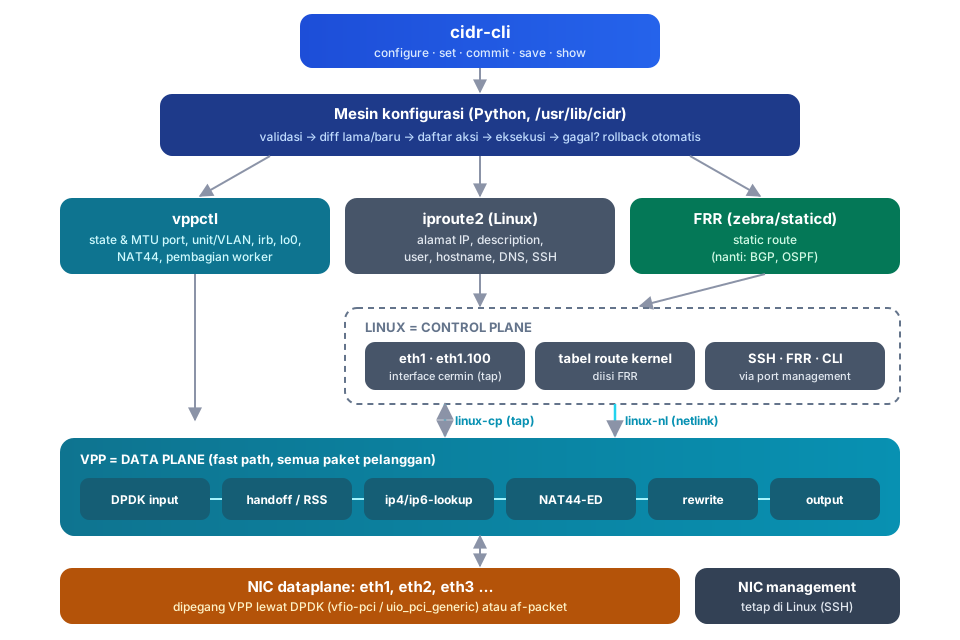
Computing ID Router: router OS berbasis Debian dengan dataplane VPP (fd.io). Semua paket pelanggan diteruskan oleh VPP di banyak core sekaligus, sedangkan Linux dan FRR menjadi control plane. Konfigurasinya lewat satu CLI: configure → set → commit → save.
Mulai dari sini
-
Instalasi
Pasang di atas Debian 12 dengan satu skrip. Pilih NIC untuk VPP; jumlah core diatur otomatis.
-
Konfigurasi pertama
Login, buat user, beri alamat IP, default route, dan NAT, lalu simpan. Semuanya dalam 10 menit.
-
Cara kerjanya
VPP sebagai jalur cepat, Linux sebagai control plane, dan
linux-cpyang menghubungkan keduanya. -
Multi-core otomatis
Worker VPP dihitung dari core fisik yang ada. Koneksi dibagi lewat RSS atau handoff.
-
Referensi CLI
Semua perintah operasional dan konfigurasi, pipe
| display set, serta pohon konfigurasi lengkap. -
Lab & uji trafik
4 VM QEMU (2 router, client, server), test otomatis, dan
bwtestiperf3 lewat router.
Sekilas
| Fitur | Keterangan |
|---|---|
| Dataplane VPP | Paket diteruskan VPP (DPDK), bukan kernel. Multi-core dengan pembagian koneksi per worker |
| CLI | Mode operasional > dan konfigurasi #, Tab-completion, bantuan ?, singkatan (sh int), pipe \| display set, \| match |
| Commit aman | Validasi sebelum diterapkan, hanya yang berubah yang diterapkan, rollback otomatis kalau gagal, riwayat 50 commit |
| Interface | Unit dengan family inet/inet6, VLAN 802.1Q (vlan-id), switching antar-port dengan gateway irb, loopback lo0, MTU |
| Routing & NAT | Static route (FRR, siap BGP/OSPF), blackhole, ECMP, NAT44 masquerade di VPP |
| User & keamanan | Root password kosong (console saja), user dengan kelas super-user / operator / read-only, hash SHA-512, SSH key |
| Pemantauan | show interfaces, show dataplane load, monitor interface traffic, show version |
| Lab | QEMU 4 VM dengan layar dan SSH, test otomatis 26 pengecekan, bwtest |
Contoh sesi
admin@edge-01> configure
admin@edge-01# set interfaces eth1 unit 0 family inet address 103.10.20.2/30
admin@edge-01# set interfaces eth2 unit 0 family inet address 192.168.10.1/24
admin@edge-01# set protocols static route 0.0.0.0/0 next-hop 103.10.20.1
admin@edge-01# set nat masquerade interface eth1.0
admin@edge-01# commit comment "uplink + LAN"
admin@edge-01# save
admin@edge-01# exit
admin@edge-01> show interfaces
Interface      Admin/Link  MTU    Addresses                      Description
------------------------------------------------------------------------------
eth1           up/up       1500                                  uplink ISP
eth1.0         up/up              103.10.20.2/30                 uplink ISP
eth2           up/up       1500                                  LAN
eth2.0         up/up              192.168.10.1/24                LAN
Status proyek
Versi 0.1 fokus pada fondasi: dataplane VPP, CLI, interface (unit, VLAN, irb, loopback), static route, NAT, user, multi-core, dan lab. BGP/OSPF, firewall, DHCP, VPN, API, dan image ISO ada di Roadmap.