Alur boot
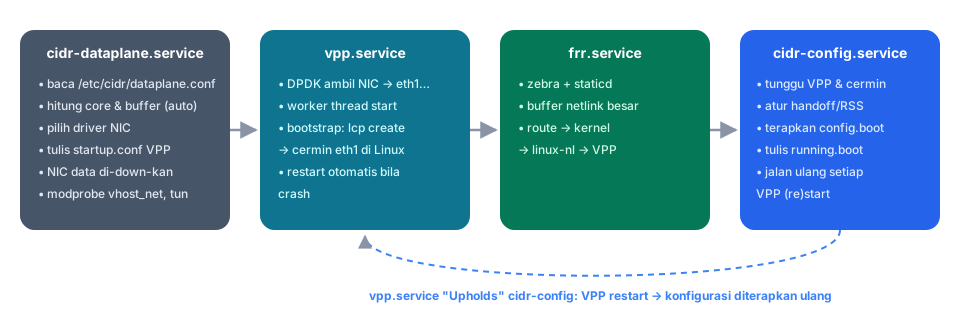
Service
| Service | Tipe | Tugas |
|---|---|---|
cidr-dataplane.service |
oneshot, sebelum VPP | Baca dataplane.conf, hitung core dan buffer, pilih driver NIC, tulis /etc/vpp/startup.conf dan /etc/cidr/vpp-bootstrap.cli, turunkan NIC dataplane di Linux, muat vhost_net/tun |
vpp.service |
utama | VPP mengambil NIC, worker start, lalu bootstrap membuat cermin linux-cp. Restart otomatis kalau crash |
frr.service |
utama | zebra dan staticd; route diturunkan ke kernel, lalu linux-nl menyalinnya ke VPP |
cidr-config.service |
oneshot, setelah VPP dan FRR | Tunggu VPP dan semua cermin siap, atur pembagian koneksi, terapkan config.boot, tulis running.boot |
vpp.service punya drop-in Requires=cidr-dataplane dan Upholds=cidr-config. Setiap kali VPP (re)start, konfigurasi otomatis diterapkan ulang.
VPP baru vs VPP yang sama
cidr-apply mengingat proses VPP yang terakhir dikonfigurasi (PID dan waktu mulai):
- VPP baru (boot, crash,
restart dataplane): VPP kosong, jadi seluruh konfigurasi diterapkan. - VPP yang sama (hanya
cidr-configyang di-restart): yang diterapkan hanya perubahannya. Loopback dan VLAN yang sudah ada tidak dibuat ulang.
Melihat log boot
Atau dari CLI router: show log.
Contoh baris penting:
cidr-dataplane: uio_pci_generic (no IOMMU and kernel lacks vfio no-IOMMU mode)
cidr-dataplane: enp0s4 (0000:00:04.0) -> VPP as eth1
cidr-dataplane: CPU: 4 CPUs (4 physical cores); VPP main thread on CPU 0, 3 workers on CPU 1-3 (auto); 24576 packet buffers per NUMA node
cidr-apply: rx-distribution eth1: handoff l4 (1 queue)
cidr-apply: applying /config/config.boot: full configuration